Dissolution of Marriage cases in Sedgwick County can be accessed through the official online portal, where you can view Sedgwick County divorce records online, check filing dates, and locate certified divorce decree copies. The system shows case numbers, spouse names, and judgment dates, helping you confirm the status of a pending or finalized filing. If a record appears missing, the court clerk can verify its existence and guide you on the request process.
When you need a certified copy of a final divorce judgment or a property division order, the Sedgwick County family court records search lets you filter by case number, filing date, or party name. You can also request sealed or confidential child custody orders, subject to court approval. Fees, ID requirements, and processing times are listed on the district clerk’s website, ensuring a clear path to obtaining the documents you need.
How to Search Dissolution of Marriage
Dissolution of Marriage records are district court case records for the legal ending of a marriage. A Sedgwick County search can locate the case number, party names, filing date, judgment date, and status shown for a pending or ended matter. You can also access court records to review official records. The search helps identify the correct court file and the next step for obtaining a decree or certified copy. An online case result does not replace the complete file or a clerk-certified decree.
Official Search Portal: https://www.dc18.org/records
Steps to Search
- Open the official records page and choose the district court case search.
- Select the dissolution-of-marriage case type if the portal presents a case-type field.
- Enter the case number when known. If no case number is available, use a spouse’s full legal name and check each surname separately.
- Compare each result by case number, both party names, filing date, and judgment date before opening any linked document.
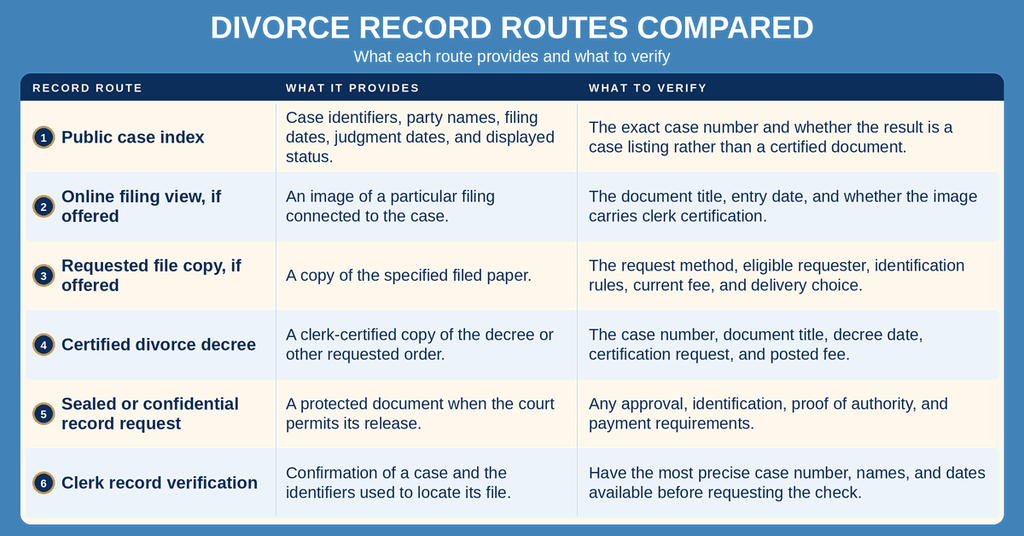
- For a certified decree or protected file document, follow the official request instructions and confirm the current fee, identification, payment, and delivery requirements.
Filings, Decrees, and Family-Court Terms
Kansas courts use the legal term dissolution of marriage; divorce is the everyday term for the same type of case. A Sedgwick County divorce records search returns case-level details, while the court file contains filed papers showing what the parties requested and what the court ordered. Labels such as petition, response, decree, judgment, property settlement, custody order, and support order refer to different papers or events. The index may identify these events without displaying each document in full.
A divorce case number is the court’s unique identifier for locating a family-law case. The petition or complaint begins the case and may show the filing date, parties, and case type. A response or answer records the other party’s reply and may indicate later case activity. A financial affidavit outlines income, assets, debts, and expenses. A property settlement agreement describes proposed property and debt division, while a spousal support order states the court-approved support terms. Parenting plans and child support orders cover arrangements and financial support for minor children, though some details may be restricted.
The divorce decree or judgment formally ends the case and outlines the court-approved terms. Post-divorce modification filings request changes to existing arrangements and may appear under the original case or a related case number. Contact the court clerk if a complete document is unavailable online. Each result is a pointer to the court file, not the file itself. A case number confirms the court matter, while the document title and date show which paper may be inside that matter. If a result lists an order or judgment, the clerk can confirm whether a corresponding image exists and which copy choices are available.
Certified Divorce Decrees and Judgment Dates
A certified divorce decree is connected to the official court record through the District Clerk’s certification process. An online image, printout, or search result can serve as a locator, but it does not become certified merely because it came from the public portal. Request a certified copy when the recipient needs proof that the decree matches the court’s record.
The filing date and judgment date answer different questions. The filing date marks the opening of the case, while the judgment date marks entry of the court’s decision. Those dates may differ depending on the events in the docket. The decree itself should show the date used by the court. If the search date does not match the date printed on the decree, ask the clerk which event the index label represents.
Later orders can change part of an earlier decree. Ask for the amended decree and any order connected to the amendment rather than relying on the first decree found in the index. The original decree remains part of the case history, but it may not state the terms currently in force.
Property Division and Spousal Support Terms
Property division, asset allocation, debt assignment, and spousal support details may appear across financial affidavits, settlement documents, and the decree. A decree may approve or incorporate settlement terms. A search result often confirms the case number and filing dates without showing the full financial terms. Request the decree and any referenced property settlement or support order when those details are needed.
The case number is the dependable field for this search; a support amount, asset name, or street address may not appear as a case identifier. A property division decree describes the court’s allocation of marital property interests, but it is not the same record as a deed. A support order states ordered obligations, yet it does not by itself prove which payments were made. Keep the decree, later modifications, and any separate payment records distinct when assembling a complete case history.
Child Custody and Post-Divorce Modifications
Child-related records may contain a parenting plan, custody order, child support order, financial affidavit, or private details about the children. The public index can identify a case and a filing date without displaying the protected text. A request for sealed or confidential child material may require court approval and proof of identity or legal authority.
A post-divorce modification may change custody, parenting time, support, or property terms. The later request may appear in the original file or in a related matter with a separate case number. Search by the original case number and each spouse’s name, then compare later filing dates and case labels. If several matters appear, ask the clerk which file contains the later order connected to the decree.
Separating Marriage, Divorce, Support, and Property Records
A marriage record documents a marriage license, certificate, or related event. A dissolution case documents court action ending the marriage. You can also explore bankruptcy records through available county records. A legal separation, support-only matter, or property case can have a different case number and should not be treated as a divorce decree. The official case caption and document title provide the clearest distinction between these records.
If the purpose is proof that the marriage ended, request the decree from the dissolution case. A property division order may form part of that decree, but it does not replace a deed or title record. A child-related order can govern support or custody, yet its filing date does not replace the decree date. Comparing the court’s record type prevents a related filing from being mistaken for the case-ending order.
Public Availability and Official Copies
Not every part of a Sedgwick County divorce case file appears in a public online search. A result may show case details while document images, exhibits, financial affidavits, and sensitive orders require a file request. Availability can differ by record type, sealing status, and court order. The District Clerk controls official copies and can verify whether a case exists even when the search screen shows no match.
Confidential Child Data and Sealed Records
Public availability does not mean every document in a family case is open. Sealed material is limited by a court order, and confidential child data may be protected by law or a case-specific order. The portal may show only the case heading or no document content. An absent image does not establish that the court file is empty.
If a child-related record is marked confidential or sealed, the clerk cannot release the protected material merely because a search result is visible. A request may require court approval and proof of identity or authority. Follow the official request route and provide only the details needed to identify the requested file and document.
Certified Copies, Identity Checks, and Payment
Viewing an online result is not the same as requesting a certified copy. The District Clerk’s current request instructions list the applicable fees, identification rules, processing times, and payment directions for each request category. Review the posting for the selected service before submitting payment. A portal search and a certified-copy order are separate actions, so one charge should not be assumed to cover both.
Use the posted processing period that matches the chosen service. A sealed-record request may follow a different schedule because court approval may be required. Mailed delivery adds transit time outside the clerk’s production work. Do not rely on a processing estimate from a third-party record site when the court has posted instructions for the same service.
Give the clerk the case number, full party names, document title, and decree or judgment date when the request form requests them. If the file includes an amended decree, property settlement, or later modification, name each document instead of referring only to “the divorce papers.” Precise identifiers reduce the need for repeated clarification and help the clerk match the request to the correct file.
Historical and Archived Case Files
An older case may appear in the index even when a document image cannot be opened. The search index and the storage location for paper records may differ. If a case appears but its document cannot be viewed, record the case number and document title, then ask the clerk whether the file has a different handling route or can be produced through a request.
For a historical decree, confirm its date and ask about later amendments before relying on it for a current matter. An older record may not follow the same request process as a recent case. The clerk can identify the available copy, current charge, and any special handling needed for the file.
Record Accuracy and Missing Results
Accurate lookup starts with exact identifiers. A search for one spouse may return several matters because a person can have more than one family-law case. The case number provides the strongest link to the correct record. Without it, compare both names, dates, court, and displayed status before requesting any document.
System Delays for Recent Filings
A recent filing can be accepted by the clerk before it appears in the public search index. A case may also appear before the court enters its decree. Individuals can also check court docket to verify relevant details. These are separate gaps: one concerns the case entry, and the other concerns a later judgment event. A filing date shown by the clerk may therefore differ from the date a result first appears online.
If the date is recent, confirm the identifiers and date range in the search. A person with a legal deadline should ask the clerk to verify the case rather than depend on an online result that has not refreshed. The clerk can check whether the filing has been entered and whether the decree image remains pending.
Unlisted Divorce Record Resolution
If a name search returns no match, try the exact case number first and then search each surname separately. Confirm the selected court and domestic case category. A former legal name, alternate spelling, or different date range can affect a name-based search. Broadening the date range may help after the exact identifiers have been checked.
If the result remains blank, give the clerk both full names, the likely filing period, and any known case number. Ask whether the file uses another case caption, remains outside the public index, or falls under a court restriction. This separates an index issue from the more serious question of whether a dissolution case was ever filed.
Pending, Finalized, Dismissed, and Modified Cases
A pending case remains open in court. A finalized case has an entered decree ending the dissolution. A dismissed case ends without an entered divorce decree, so the dismissal order controls that outcome. A modification does not erase the original decree; it creates later terms through another order that may change support, custody, parenting, or property division.
Portal status labels can be brief and do not show the entire case history. Do not treat a petition entry as the decree or assume that the newest visible filing contains every court term. If several results or orders appear, request the complete docket and the operative decree. Compare each document’s date and title before drawing a conclusion about the case outcome.
An amended divorce decree or post-decree order can supersede part of an earlier decree. Request the original decree, the amendment, and any later connected orders when current terms matter. This is especially important for property division, spousal support, and child-related arrangements because one early document may no longer reflect the court’s current orders.
Contact Information
For case-number verification, certified-copy requests, or questions about restricted family records, use the following county contact details.
Frequently Asked Questions
Find quick answers about locating and obtaining Dissolution of Marriage records in Sedgwick County.
How to find a Dissolution of Marriage in Sedgwick?
Start at the Sedgwick County District Court website and select the Records search link. Enter the parties’ names or case number to view the docket. The online view shows filing date, judgment date, and current status. Note that the screen result is a summary; the full file lives at the clerk’s office on the 6th floor of the courthouse. To pick up the official document, schedule a visit or call the clerk at (316) 660‑5900 during business hours.
What info appears on a Sedgwick divorce case search?
The search result lists the case number, names of both spouses, the date the petition was filed, the date the judgment was entered, and whether the case is pending or closed. It may also show the type of judgment, such as final decree or amendment. If the case is sealed, the portal will note that no details are available. For any missing data, contact the court clerk for assistance.
How long for a certified divorce decree?
After you request a certified copy, the clerk typically processes it within five to ten business days. Processing time can extend if the record requires verification or if there is a high volume of requests. You can pick up the certified decree in person or ask the clerk to mail it. Providing a clear case number and paying the required fee helps avoid delays.
Can I request Sedgwick dissolution records online?
Yes. Visit the official portal at https://www.dc18.org/records, choose the “Dissolution of Marriage” option, and fill in the required fields. Submit the request and pay any applicable fee using a credit card. Once approved, you can download a PDF copy or schedule a pickup at the courthouse. If the record is restricted or sealed, the system will inform you that a manual request is needed.
What fees apply for a divorce record copy in Wichita?
Fees are set by the Sedgwick County District Court and depend on the type of copy you need. A standard certified copy usually carries a modest charge, while expedited service may cost more. The exact amount is listed on the clerk’s website or can be confirmed by calling (316) 660‑5900. Payment is accepted by cash, check, or credit card when you collect the document.